Google Business Profile Is Sending You Visits You Can't See. Here's How Multi-Location Brands Track Them.
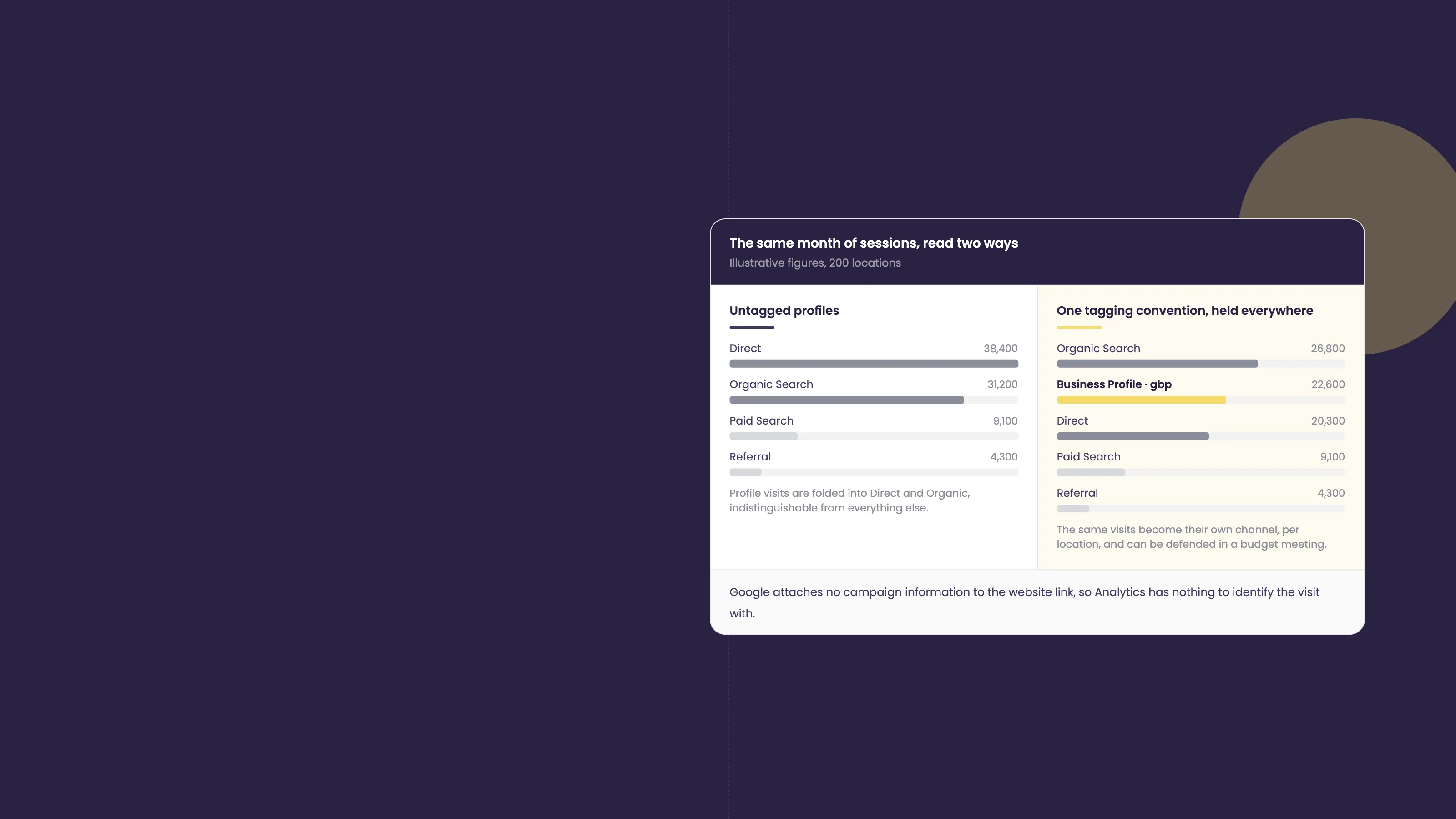
Your Google Business Profile dashboard says interactions are up. Calls, clicks and direction requests are climbing. Then you open Google Analytics to prove it drove revenue, and the traffic is nowhere. It has quietly been folded into “Direct” and “Organic”, indistinguishable from everything else. For a single shop that is a mild annoyance. Across two hundred locations it is a reporting black hole that quietly puts your entire local budget at risk.
“Most brands can see their Google Business Profile activity climbing, but the moment that click lands on the website it vanishes into ‘Direct’. You cannot defend a local budget with traffic you cannot name. Tagging every profile at the source is how you turn invisible visits into a number the CFO respects.” - Quinton McHaffie, Co-Founder & Global Head of Growth at Social Places
Why your Google Business Profile traffic disappears
When someone taps the website link on your Google Business Profile, Google does not attach any campaign information to that click. Analytics has nothing to identify it with, so it defaults the visit into “Organic Search” or, very often, “Direct”. The result is that one of your highest-intent local channels gets blended into buckets you cannot separate out later.
It gets worse. Calls, direction requests and “get quote” taps never touch your website at all, so they never reach Analytics in the first place. The activity is real and it is converting. It is just invisible in the one report your leadership team actually reads.
The multi-location multiplier: one messy store poisons the whole dataset
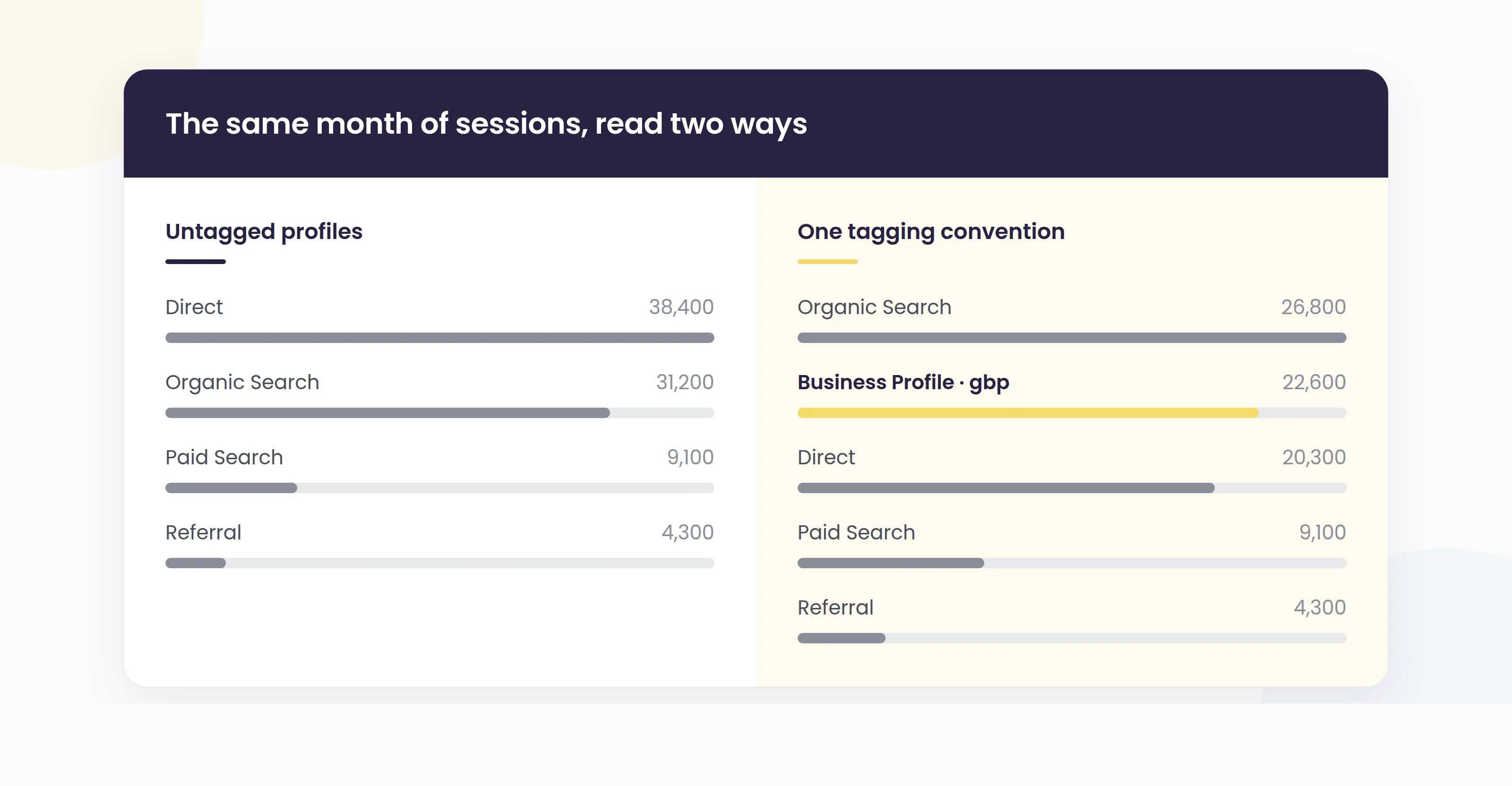
At a single location, an untagged link is a small blind spot. Across a large estate it compounds fast. When every branch, agency and franchisee tags links their own way, or not at all, your brand-level report turns into scattered gravel. Ten locations using ten naming styles do not add up to one trustworthy number.
This is the trap most multi-location brands fall into. They try to fix attribution store by store, long after the data has already been polluted. The only version that works is a single convention, set once, held across every location, from day one.
The fix: a tagging convention that scales
The fix is UTM parameters: small tags added to the end of a URL that tell Analytics exactly where a visit came from. You can build them for free with Google’s Campaign URL Builder, and once they are in place, Google Analytics reads them as their own channel instead of dumping them into “Direct”.
For a multi-location brand, the convention matters more than the tags themselves. Lock it before anyone touches a profile:
-
utm_source stays constant, for example
google, so every location rolls up together. -
utm_medium identifies the channel, for example
gbp, so profile traffic separates cleanly from paid, organic search and email. -
utm_campaign carries the location identifier: a store code or city-suburb value that is identical to the one in your listings data.
-
utm_content names the profile element, for example
website-button,menu,appointmentor a specific Google Post, so you can see which parts of the profile actually drive clicks.
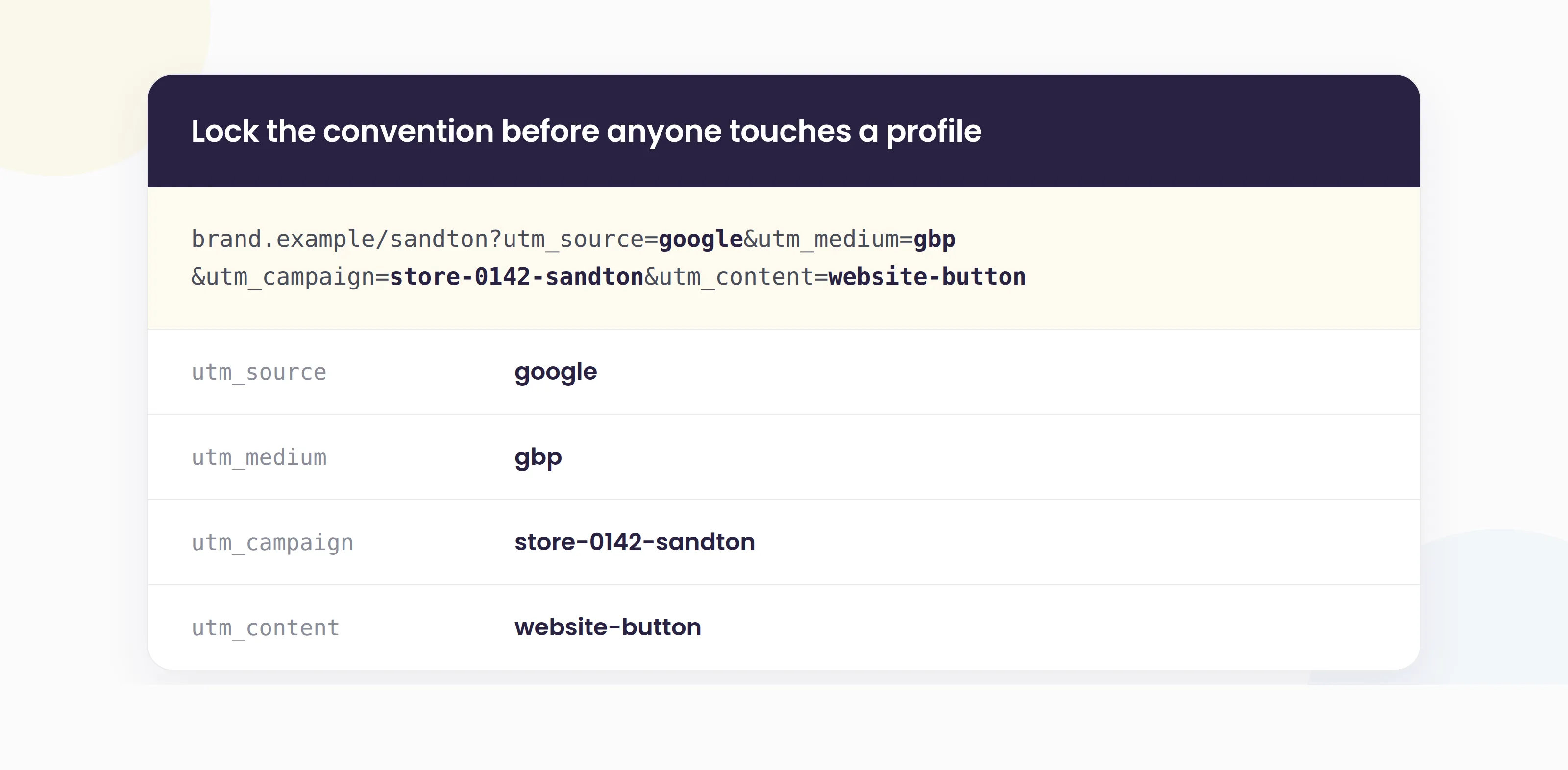
Apply the same structure to every clickable link on every profile, including each Google Post call to action. Consistency is the whole game. A tag that means one thing in Cape Town and another in Johannesburg is worse than no tag at all.
Tracking beyond the click: calls, directions and bookings
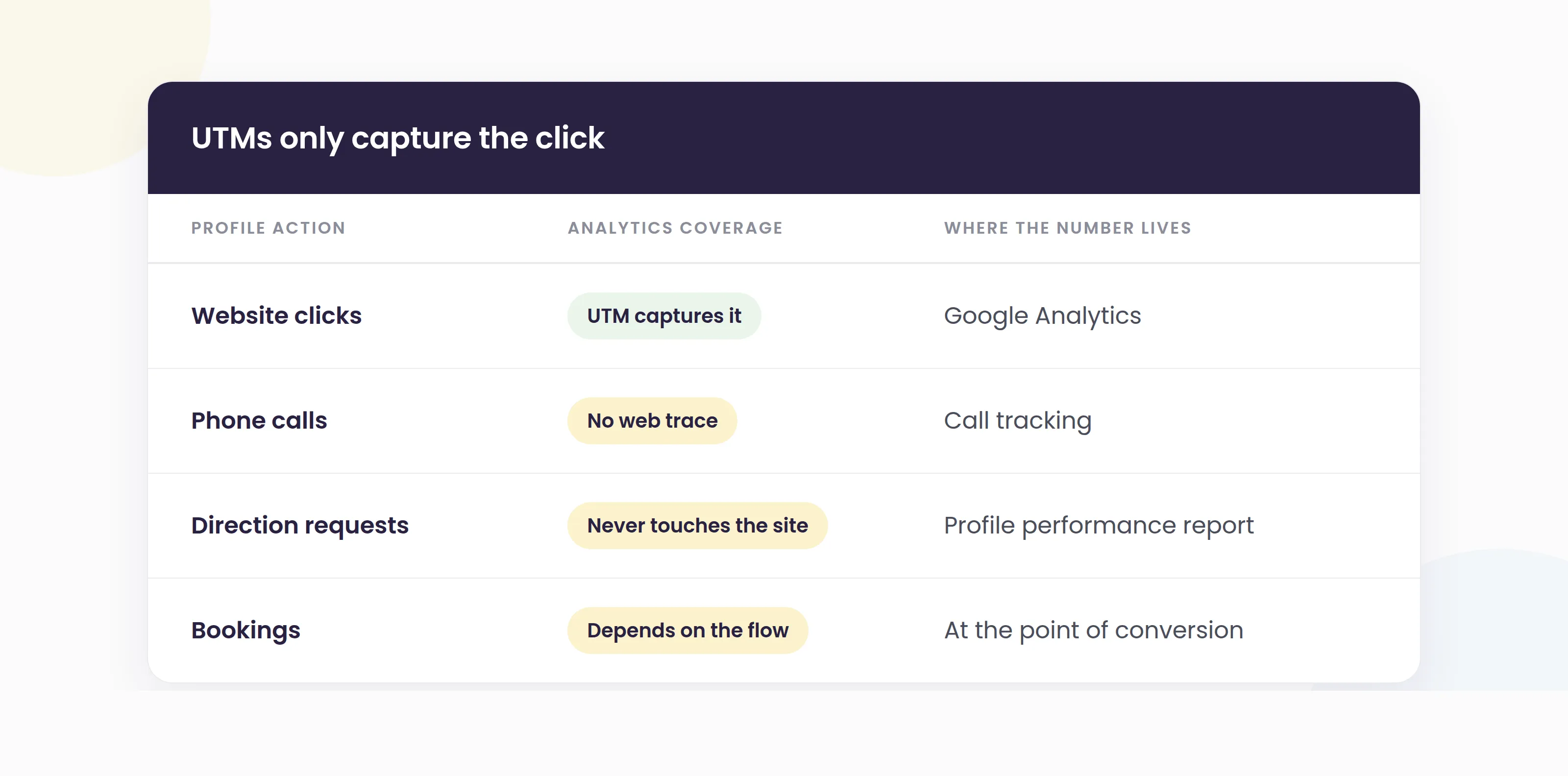
UTMs only capture website clicks, so they are only part of the picture. To see the visits that never reach your site, combine them with the raw activity data:
-
Calls need call tracking to be attributed properly, since a phone call leaves no trace in web analytics.
-
Direction requests and profile interactions live in the Google Business Profile performance report, which counts them per location even though they never hit your website.
-
Bookings should run through a flow that records the source at the point of conversion, so a table or appointment can be traced back to the profile that generated it.
The honest caveat: no single dashboard stitches all of this together automatically. Proper local attribution means reading your Business Profile performance data alongside a consistently tagged Analytics view, and doing it the same way for every location so the totals mean something.
Why this matters more in the AI search era
As AI answers and zero-click results keep more searches inside Google, the classic website visit is getting rarer while the profile itself does more of the converting. That makes the visits your Google Business Profile drives both harder to see and more valuable to prove. Brands that cannot measure their local channel will keep having its budget questioned. Brands that can measure it can defend it, and grow it, with evidence.
How Social Places helps multi-location brands prove local ROI
Attribution is only ever as trustworthy as the location data underneath it. Social Places Listings keeps every location’s data accurate and consistent across platforms, and its location groups let you standardise reporting and its ROI calculator across the whole estate rather than store by store. Instead of pointing profile links at a generic homepage, Store Locator and local pages give you owned, per-location landing pages that you fully control and can tag cleanly. On top of that, AI Reports and Insights pulls Listings, Reputation and Social into one live report, so the story of what each location is driving lives in a single place. Software, plus a team that sets the structure up correctly from the start.
If your local channel is converting but you cannot prove it, that is a fixable problem. Contact Us
Frequently asked questions
Why does my Google Business Profile traffic show as "Direct" or "Organic" in Google Analytics?
Because Google does not automatically add campaign tags to the website link on your profile. With nothing to identify the visit, Analytics defaults it into "Organic Search" or "Direct". Adding UTM parameters to the link fixes this and lets Analytics report profile traffic as its own channel.
What UTM parameters should a multi-location brand use for Google Business Profile?
Keep utm_source constant (for example google), use utm_medium to mark the channel (for example gbp), use utm_campaign to carry a consistent location identifier such as a store code or city, and use utm_content to name the profile element like the website button, menu or a Google Post. The key is using the exact same structure for every location.
Can I track phone calls and direction requests from Google Business Profile?
Not through UTMs alone, because those actions never reach your website. Calls need call tracking to attribute properly, while direction requests and other interactions are counted per location in the Google Business Profile performance report. Reading that data alongside your tagged web analytics gives you the full picture.
How do I keep tracking consistent across hundreds of locations?
Set one naming convention before anyone edits a profile, tie the location identifier to the same values in your listings data, and manage it centrally rather than leaving it to individual branches or franchisees. Standardising the structure once is far easier than cleaning polluted data later.