Duplicate Business Profiles: Why Google Is Hiding Some of Your Stores
A customer searches for your store, and Google shows them nothing. The store is open, the profile exists, and someone on your team verified it months ago. The problem is that Google found two profiles for one location, decided one of them was a duplicate, and quietly stopped showing it.
Multi-location brands keep asking the same question about this: what does “duplicate” actually mean, and why can’t we just delete the extra one? The honest answer is that the fix depends almost entirely on who owns each profile.
1. What Google Actually Means by “Duplicate”
Google’s rule is short: you can have only one Business Profile for each business. Its help page on duplicate profiles lists three situations that get a profile flagged:
- A verified profile already exists for the same business
- More than one profile sits at the same address
- Several profiles exist for the same business, each offering different services
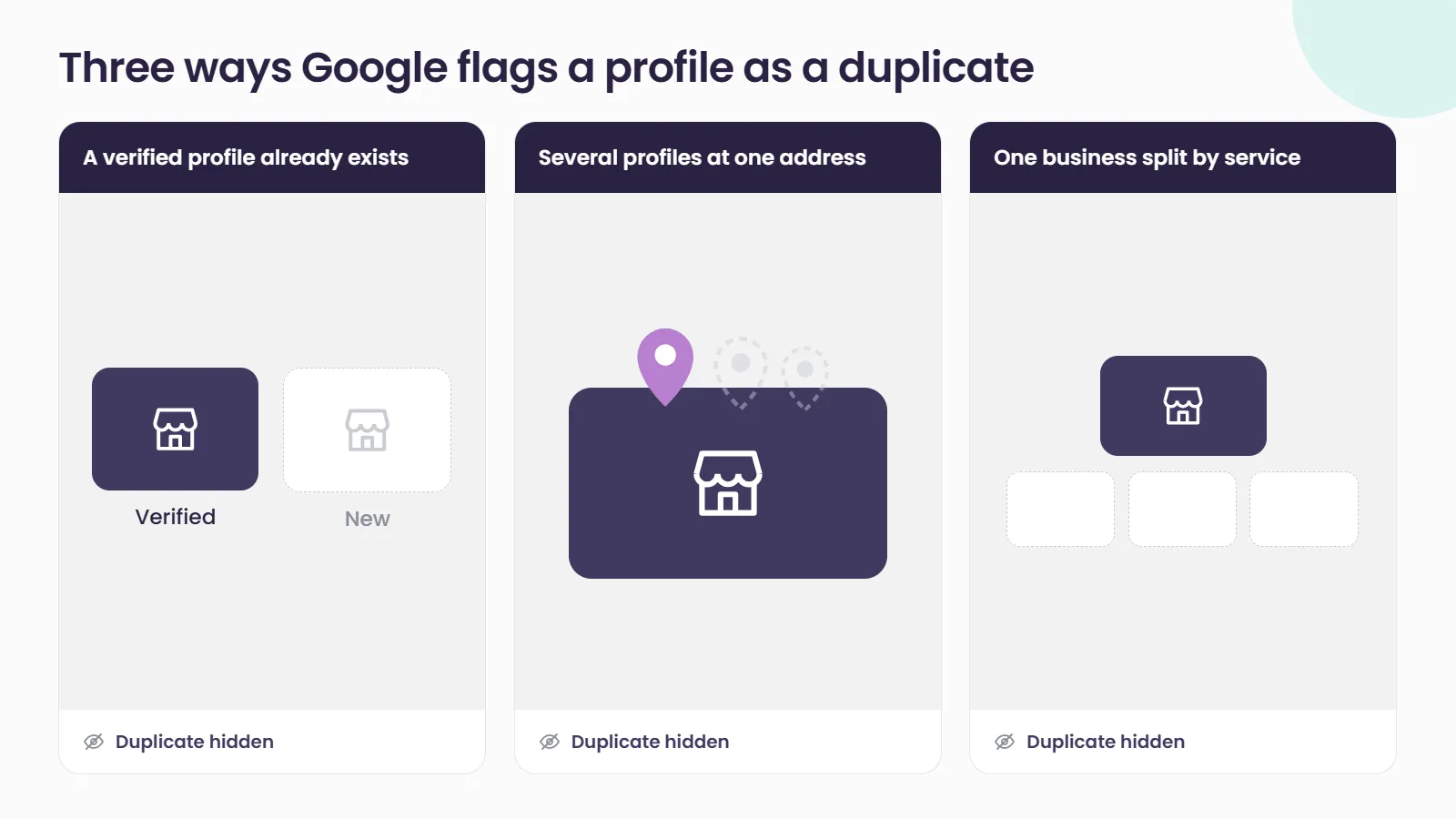
The consequence is the part that matters. Google states that if a profile is considered a duplicate, it won’t show on Google Search or Maps.
For a single shop, that is a nuisance. Across a network of stores, duplicates tend to cluster in exactly the places that are hardest to see from head office: franchise branches, relocated stores, sites that changed brand or trading name, and dealerships or retailers that carry several brands under one roof.
2. The Shadow Estate: Profiles Carrying Your Name That You Don’t Control
Most duplicate problems in a multi-location network are really ownership problems. We call it the shadow estate: the profiles that represent your brand but sit outside your control.
They usually arrive the same way:
- A former employee created or verified a profile on a personal or departed work account
- A previous agency set itself up as the owner rather than a manager
- A franchisee or branch manager created a listing before head office got to it
- A store moved or rebranded, and a new profile was created instead of the old one being updated, which is the opposite of Google’s guidance to update the existing profile’s address when a business relocates
Google’s own third-party policy is clear that end customers must retain ownership or co-ownership of their Business Profile at all times, and that agencies should be invited as managers, not owners. The same policy requires an agency to give a client the ability to regain exclusive control of their profile within 7 business days of that client’s notice. Many older networks were set up before anyone checked.
If you are planning bulk verification, clear the shadow estate first. Google’s bulk verification guidelines state that duplicate, suspended or disabled profiles don’t count towards the 10-profile minimum, and unresolved duplicates and ownership gaps can hold up a bulk verification request for a multi-location brand.
3. Requesting Ownership: The Three-Day Clock
When the verified profile for one of your stores belongs to someone else, Google’s route is to request ownership from the current owner.
Here is how Google describes the process:
- The current owner is notified by email and has 3 days to respond
- If they deny the request, you can appeal the decision
- If there is no response after 3 days, you may have the option to claim the profile, but Google notes this option isn’t always available
Two practical points follow. First, a request sent to an inbox nobody reads is not a fast route, because the outcome after the three days is not guaranteed. Second, ownership changes are slower than they look on paper. Google’s owners and managers guide says a profile can have only one primary owner, the primary owner cannot remove themselves until they transfer that role, and new owners and managers must wait 7 days before they can remove other owners or managers, delete a profile or transfer primary ownership.
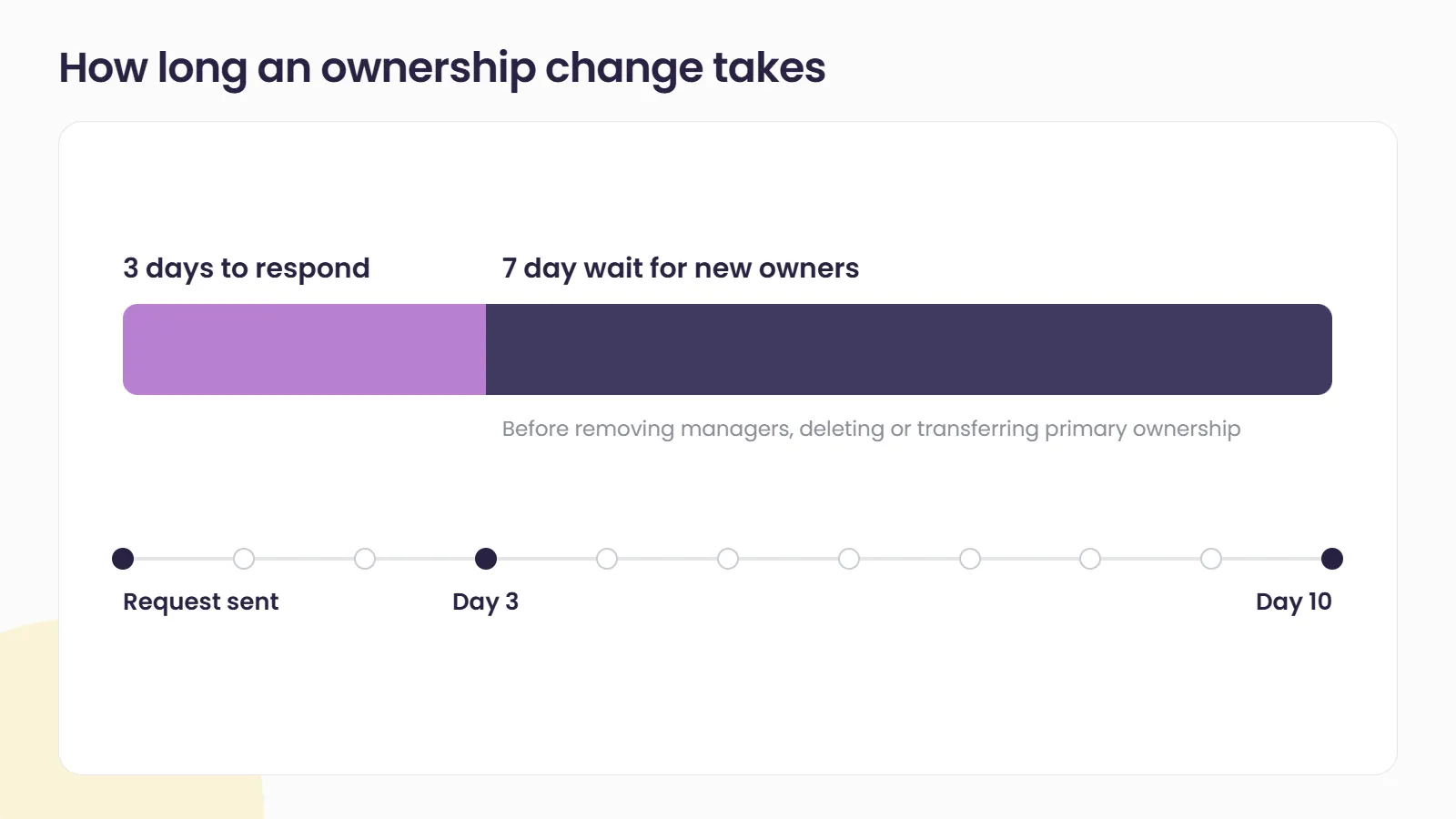
Build that time into any store opening, relocation or agency change.
4. Merge, Remove or Leave It: Choosing the Right Fix
Once you know who owns each profile involved, there are three options, and each has a cost.
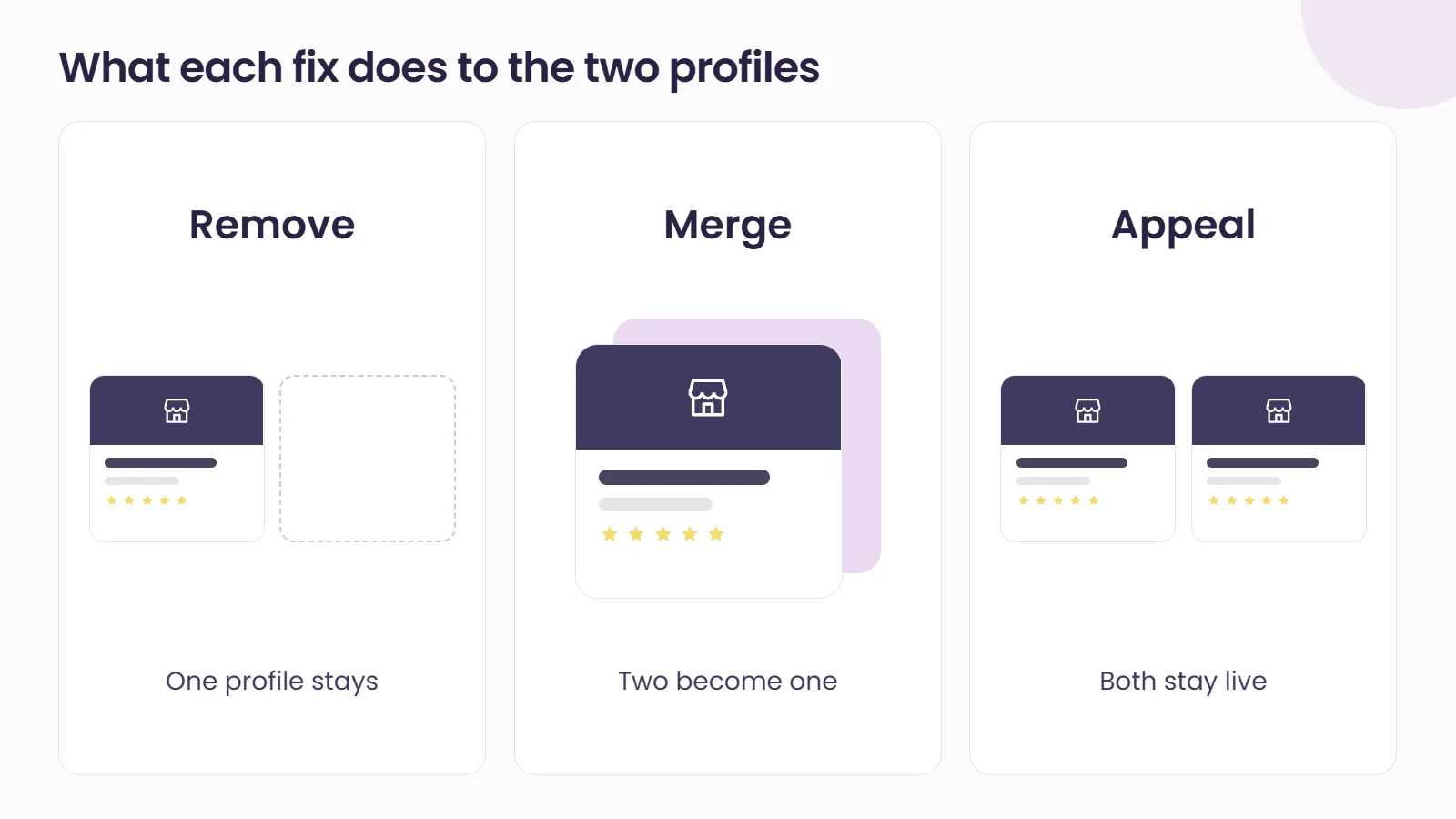
Remove the duplicate. If you created a duplicate by mistake, Google says you can remove it from your account without affecting the verified listing. But removing a profile removes all of its content and linked managers, so be certain you are removing the right one. If the duplicate carries the store’s review history, removal is the wrong tool.
Request a merge. Google’s route for this is to report a suggestion on Google Maps, and every merge request is subject to review. When two profiles are merged, their reviews are combined, but replies to reviews may be lost. Google says that for a merge to succeed, both profiles must represent the same business and should have the same information. In other words, clean the data on both profiles before you ask.
Leave it, and appeal the status. Sometimes the “duplicate” is not a duplicate at all. Two genuinely separate businesses at one address, such as a store and a separately operated service counter inside it, can be wrongly treated as one. Google allows you to contact support to appeal duplicate status, and where both serve customers at the same location it asks for evidence of permanent signage.
What you cannot do is force any of these outcomes. You can request, evidence and appeal. Google decides.
5. Why Every Unfounded Support Ticket Costs You
The instinct when a network is full of duplicates is to raise a ticket for every one of them and keep raising them until something moves. That approach carries a real risk.
Google’s third-party policy includes a section on misuse of support channels. It lists false or misleading reports and reports made in bad faith as examples of unfounded complaints, and it states that repeated unfounded submissions can result in rejection of all further complaints without assessment.
For a brand with hundreds of locations, that changes the order of work. Audit first, confirm which profiles are genuinely duplicates and who owns each one, gather the evidence, and only then go to support with a case that will stand up. One well-documented request is worth more than ten speculative ones.
It also links to a wider point about access hygiene. The same scattered ownership that creates duplicates also spreads risk, because a single restricted Google account can affect every location it manages.
How Social Places Helps Clean Up Duplicate Profiles
Our Listings team runs a full audit, claiming and verification process across every location, including data cleansing, rogue page search and suppression, and verification managed directly with Google and store teams. That means the shadow estate gets mapped before anyone raises a ticket, ownership requests go to the right people, and your store data is consistent before a merge or bulk verification request is submitted. If you are not sure how many of your stores are currently hidden as duplicates, talk to us.
Related reading
- Bulk Verification: The Multi-Location Google Setup Step Most Brands Get Wrong, on getting chain-level verification approved once your profiles are clean
- Someone Is Trying to Claim Your Client’s Listing. Right Now., on defending the profiles you already own against unwanted ownership requests
- One Restricted Google Account Can Suspend Every Location You Manage, on why spreading access across accounts matters
Frequently asked questions
What happens to a Google Business Profile marked as a duplicate?
Google states that a profile considered a duplicate won't show on Google Search or Maps. The profile still exists, but customers searching for that store will not see it, so any reviews, photos or updates on it stop doing any work for you.
Can I delete a duplicate Google Business Profile that someone else owns?
Not directly. You can only remove profiles from an account you control. Google does let anyone request removal of a profile from Search and Maps, but only where the business never existed or isn't eligible, which rarely fits a duplicate of a real store. For a duplicate, the usual routes are a merge suggestion on Google Maps or an ownership request. If you request ownership, the current owner has 3 days to respond, and if they don't, you may have the option to claim the profile, although Google says that option isn't always available.
Do reviews transfer when two Google Business Profiles are merged?
Google says reviews are combined when two profiles are merged, but replies to those reviews may be lost. For a merge to succeed, both profiles must represent the same business and should have the same information, and every merge request is reviewed.
Should our agency be the owner of our Google Business Profiles?
Google's third-party policy says end customers must retain ownership or co-ownership of their Business Profile at all times, and that agencies should ask to be added as managers rather than owners. Keeping ownership with the brand makes ownership changes and duplicate clean-ups far simpler later.