Twelve New and Redesigned AI Visibility Report Blocks
Knowing your AI Visibility score is one thing. Knowing which competitor took your share, on which platform, for which prompt, and which page on your site AI actually links to is what lets you do something about it. This release adds three new report blocks and rebuilds eight existing ones, so the report answers those questions directly.
Everything is live now and available from the block gallery in your report builder.
Three new blocks
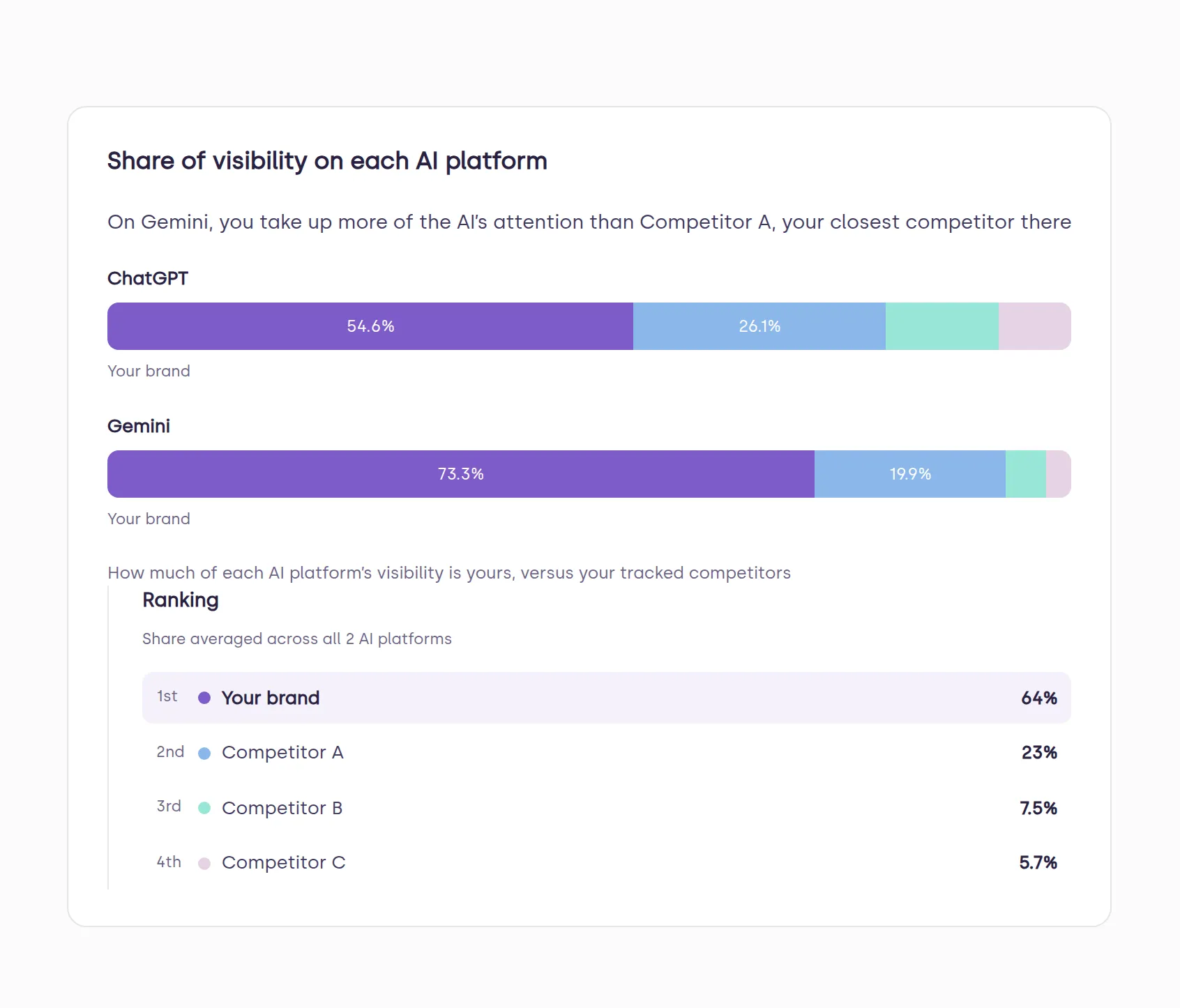
Share of Visibility on Each AI Platform. For every AI platform you are tracked on, a full-width bar shows how visibility splits between you and each tracked competitor, with a ranking panel alongside so you know where you stand platform by platform. Your own brand keeps a locked spot in the legend, so it is never hidden behind a competitor.
Share of Links Over Time. Tracks what share of the links in AI answers point to your website, plotted over time next to the other sites the assistants lean on most. Points reflect the running period figure rather than single-day snapshots, so the trend line is meaningful rather than jumpy.
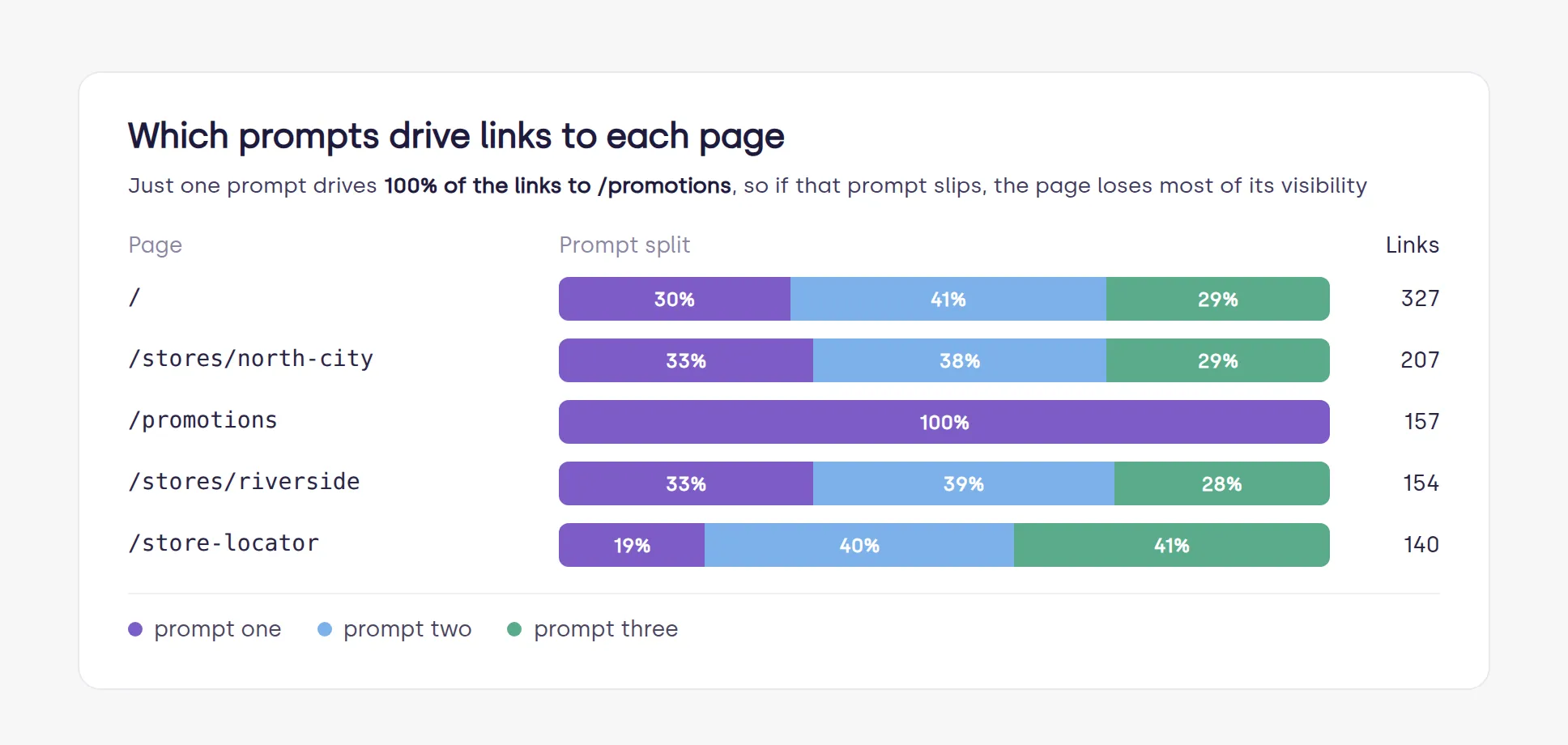
Which Prompts Drive Links To Each Page. For every page on your site that AI links to, a stacked bar shows which prompts earned those links. It exposes concentration risk: whether a page depends heavily on one prompt, which hurts the moment that prompt slips, or earns its links broadly.
Eight blocks got an upgrade
Same data, read faster. Every figure reconciles to the Brand Scores card and the Overview.
AI Visibility Score Over Time. Spaced by the real dates you were tested rather than evenly spaced points, with a ranking panel that updates live as you scrub through the chart.
Share of Visibility vs Competitors. One full-width bar with your segment highlighted, and a side list giving every competitor’s rank, share and movement since last period. Outside the top five you still see your real rank instead of being grouped into “everyone else”.
Score on Each AI Platform. One consistent 0 to 100 scale, so bar heights are directly comparable platform to platform. A competitor still shows even if they have only been scored on one platform.
Prompts vs Competitors. For every prompt you track, who is ahead and by how much, on one shared scale per prompt.
Pages AI Links To. Every page AI has linked to on your site, previously capped at the top ten, with the prompt that earned each link and the platforms doing the linking.
Prompt By Location. An all-locations average pinned at the bottom of the table, so an over or under performing location is obvious. A location where you were not mentioned at all is labelled as such instead of showing a misleading rank.
Top Linked Websites. Every website AI links to in your industry, ranked by link frequency, with your own site highlighted at its true market rank even when that rank falls outside the list.
Linked Websites by Prompt. A matrix of which websites get linked for which prompts, your own column pinned first, colour intensity showing link volume. It calls out the prompt where you are weakest and who is winning those links instead.
The score formula has changed too
This release also introduces a new formula for the AI Visibility score, built to reflect your visibility in AI answers more accurately. Treat the score as a fresh baseline from this release onward rather than reading it against numbers produced under the old formula. Every block, new or rebuilt, reconciles to the new score.
One thing worth doing
If a saved report already carries Score Over Time, Pages AI Links To or Share of Visibility, remove and re-add the block to pick up the new, larger layout. Saved blocks keep their old size until you do.
How to access it
The blocks sit in the report builder gallery inside the AI Insights Hub and are available to every brand tracked by AI Visibility. Your account manager can build the report with you and set the cadence it sends on.
New to Social Places? Book a demo and we will show you where your brand stands in AI answers today, or get a free audit.
Frequently asked questions
Do I need to rebuild my reports?
No. Existing reports keep working. Add the new blocks from the gallery, and re-add the three redesigned blocks listed above if you want their larger layout.
Where do the website logos come from?
They are website favicons, fetched live from a public favicon service using the domain in the report. If a site has no favicon, it falls back to a coloured chip with the site's initial.
Does this change my score?
Yes. Alongside these blocks, the AI Visibility score now uses a new formula that more accurately reflects your visibility in AI answers, so it is not directly comparable with scores produced before this release. Every subtotal in the new blocks reconciles to the new score, to its grand total and to the Overview.